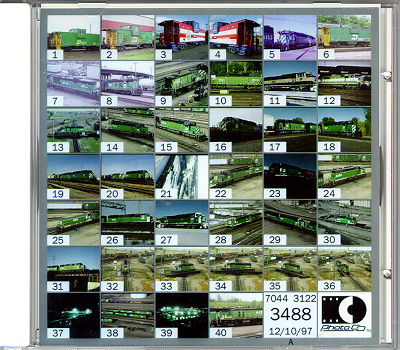
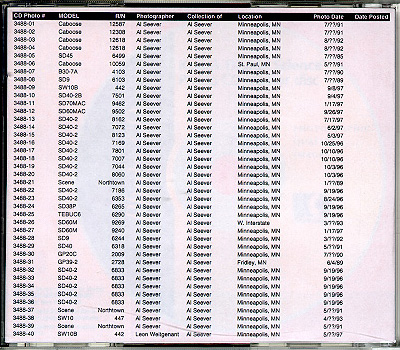
Photo CDPhotoCD is a scanning service offered by Kodak. I really like the service, and stubbornly insist that I have PhotoCD master files for all images I post.The main reason I like PhotoCD, is that it is fairly inexpensive for me (a local lab charges me a flat rate of $.88 per image) and saves me a lot of time. Also, when I started this project, a slide scanner was a bit too pricey, and PhotoCD allowed me to get good quality scans, and all I needed was a CD-Rom drive and software for viewing and editing the images. I had some experience with both flatbed scanners and a slide scanner, and did not feel that I could match the quality of PhotoCD scans, so I decided to adopt PhotoCD as my means of scanning images. Had I decided to purchase a scanner, I am certain the average quality of the images on the site would not be as good, and I would not have nearly as many images posted, as I would have to spend a great deal of WHATSNEWal time scanning the master images. After gaining experience with PhotoCD, I have found that it is very convenient to have exactly 36 (formerly 40) images scanned at a time, even though a PhotoCD can hold up to 100 images. Fortunatley I pay a flat rate per image, so there is no reason for me to chose 100 over 36, but even if I did have to pay a media fee (like $10 per CD and $.75 per image) I would pay the extra for the convenience of working with exactly 36 images per CD. I prefer to work with multiples of 36 (or 18) for several reasons: First, the thumbnail index sheet that comes standard with a finished PhotoCD holds exactly 36 images (formerly 40, as shown in sample). I have scanned a sample PhotoCD front cover to illustrate this thumbnail index. If I scan exactly 36 images, I can view the entire contents of the CD without having to open the CD case or put the CD in my computer, which is very handy. Second, I usually store slides in plastic sheets which hold 20 slides per sheet. Two of these sheets contain 40 slides. This also helps me keep things organized. It also seems to help the folks at the photo lab keep organized. I have probably had about 3 mistakes per 1000 slides scanned when I scan 36 (or 40) slides at a time. In all three instances where I have had a CD with 100 images made, there was at least one mistake made (one slide scanned twice, another not scanned at all). Third, I print my own CD backs that I designed with 36 (again, formerly 40) lines of information corresponding to the 36 images on the CD. I have scanned a sample PhotoCD back cover to illustrate this information. Once I have this printed, I can return the slides immediatley and not wait until I am converting the images for posting on the website. While I really like to have PhotoCD's with exactly 36 images, I do not necessarily have to have CD's with 36 images. I am willing to accept PhotoCD master files by just about any means, including e-mail. So far, only one person has emailed me a PhotoCD master file, and it remains the only image that I have posted that I received by e-mail. Sorry to be so longwinded on this topic, but the most frequently asked question of potential contributors is "Why do you insist on PhotoCD?" I hope this clears up many of these questions. |
 |
|---|